
Receive Updates About ProductsUpdated 4 months ago
Receive Updates About Products You Have Saved
Stay informed about the products you love! When you favourite a product, you can subscribe to receive updates so you never miss out on:
Sales or discounts
Restocks
New sizes, colours, or styles
Step 1: Save Your Favourite Products
By clicking the bookmark icon
 at the top right corner of the product page, you save the product to your favourites.
Usually located at the top right corner of the product page.
May be outlined when inactive, and filled in when the product is saved.
Looks like a flag-shaped icon similar to a page marker.
Step 2: Subscribe for Updates
After saving a product, a “Subscribe to Product Updates” popup or form will appear.
Fill in the required fields:
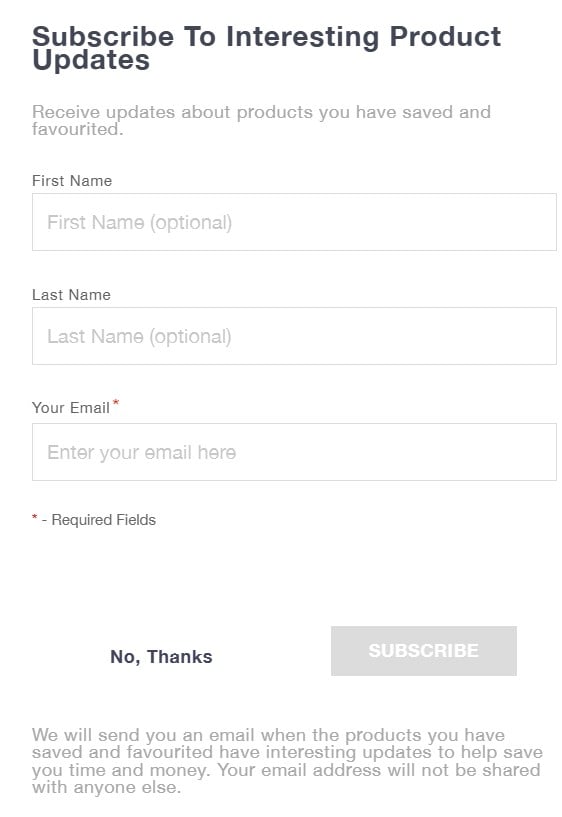
Click Subscribe to confirm.
Step 3: Receive Updates
Once subscribed, you’ll get emails when:
Price drops or special offers
Restocks and availability updates
New sizes, colours, or styles added
Step 4: Why the Subscribe Popup Shows Only Once
The first time you save a product, the popup appears so you can subscribe. After that, it won’t show again because your browser remembers you already saw it.
This helps avoid showing the popup over and over.
If you want to see it again, you can use a different device or browser or clear your browser cookies.